
Skip to content
Back to presentation
TECHNICAL OVERVIEW

Deployment, architecture and delivery scope

A concise overview for evaluating what StockIMS contains, how it is deployed, how access is controlled and what is delivered after acquisition.

01

Identity

Local accounts / Microsoft Entra SSO

02

Application

StockIMS / hardened Docker runtime

03

Operational data

PostgreSQL 18

04

Files and objects

Persistent local / private S3-compatible

05

Connections

Email / collaboration / identity / imports / AI

TECHNICAL ATLAS / INTERACTIVE

Trace how StockIMS fits your operating environment.

Switch deployment context, then inspect the control layers that move identity, operational data and evidence through the platform.

Deployment context

Run the application and data services inside infrastructure your organization controls.

  • Linux or Windows Server through WSL2
  • Docker Compose and persistent storage
  • Private PostgreSQL networking
  • Health checks and versioned migrations

Inspect a control layer

STATE / PERMISSIONS

Access resolves from role to operating scope.

System or custom roles establish the baseline. User-level overrides handle exceptions without multiplying roles, while office, license-category and networking scopes narrow the result.

CONTROL SEQUENCE

01

Role baseline

02

User override

03

Office / category scope

04

Allowed action

AVAILABLE SURFACES

DashboardEmployeesInventoryLicensesNetworkingAuditManageBackups
Every protected surface evaluates the effective permission before data or actions are exposed.
ROLE + OVERRIDE + SCOPE = EFFECTIVE ACCESS

02 / TECHNICAL CONTROL PLANE

Configuration is visible. Control is testable.

Explore the current administrative surfaces behind StockIMS. Each capability connects a visible operator action to a policy decision, a durable state change and an auditable event.

Control-plane explorer

Current application UI
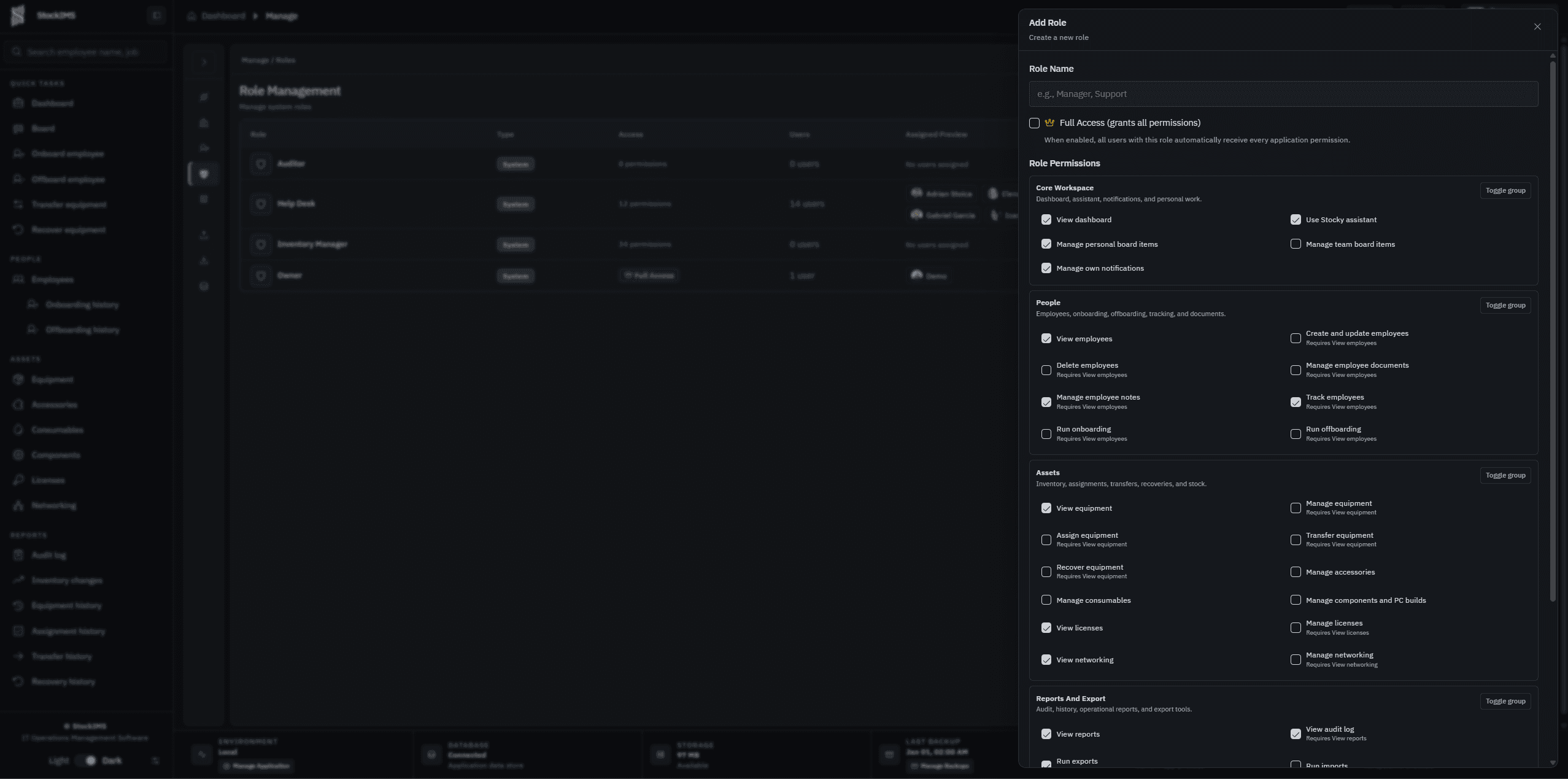
Current StockIMS create-role panel with granular permissions

01 / Authorization

Permission intent is explicit

Compose reusable roles from granular permissions across people, equipment, custody, licensing, network and administrative domains.

01Operator intent
02Authorization policy
03Domain transaction
04Audit evidence

Policy decisions, material state changes and administrative actions create attributable evidence inside the deployment you control.

PRODUCTION CAPABILITY MATRIX

A complete operating surface, organized for technical evaluation.

Explore the production scope by responsibility. Select an area to see exactly what your team can evaluate without working through internal engineering documentation.

01 / 05

Identity and access

7 capabilities ready for your team's evaluation.

  • 01Local authentication
  • 02Microsoft Entra SSO
  • 03TOTP MFA
  • 04Password policy and account lockout
  • 05Custom roles and user overrides
  • 06Office, licensing and networking scopes
  • 07Server-enforced authorization

INTEGRATION MATURITY

Direct connections and controlled imports—clearly distinguished.

StockIMS distinguishes direct application connections from controlled data-import workflows. Directory and device exports are previewed and validated before import, protecting the operational database from opaque bulk synchronization.

Configurable connections

  • SMTP email
  • Slack webhooks
  • Microsoft Teams Workflow / webhooks
  • Microsoft Entra SSO
  • Your configured AI provider
  • Jira ticket formatting and linking

Preview and import workflows

  • Entra directory structured-data export
  • Intune device structured-data export
  • Jamf device structured-data export
  • Preview before import
  • Field mapping and validation

Deployment and monitoring foundation

  • Azure Monitor guidance
  • Application health endpoints
  • Infrastructure monitoring integration points
  • Environment validation

WHAT YOU CONTROL

An operational platform you can inspect, deploy, and continue developing.

After acquisition, you own the platform's technical direction instead of depending on a closed vendor environment.

01Complete application source code
02Database schema and migrations
03Docker and deployment material
04Setup and configuration guidance
05Backup and restore procedures
06Security and acceptance evidence
07Integration guidance
08Your infrastructure
09Your roadmap

START WITH THE OPERATIONAL GAP

Show us where control breaks down.

Choose the outcome you need. The inquiry maps it to the StockIMS operating model, so our first conversation starts with useful context—not a generic sales script.

01 / CONTEXT
What should StockIMS help you control first?

Inquiry context map

LIVE CONTEXT
01Inventory
02Assignment
03Employee
04Audit trail

We will focus the conversation on

We need a clearer view of equipment ownership, location, status and lifecycle history across our organization.

Prefer a direct channel?

Your generated email includes the same evaluation context.

02 / BRIEF

Build your evaluation brief

A few details help us prepare the right product and technical walkthrough.

0 / 4000
Open in email

The form clears only after delivery is confirmed.